Process Awareness First. AI Use Second.
What is Process Feedback?
AI detectors are unreliable and don't help students learn. Process Feedback takes a different approach: instead of guessing, just look at what actually happened. As students write, it captures their editing time, revision patterns, copy-paste events, and AI usage. The result? A clear picture of how the work was created along with evidence that can start honest conversations about learning. Unlike other similar tools like Draftback, Revision History, or Turnitin Clarity, it is free and built on peer-reviewed research published in Education Sciences.

Our approach shifts the conversation from 'Did you cheat?' to 'How did you learn?' Students can demonstrate their effort transparently. Teachers can identify who needs help before deadlines, not after. And when AI is involved, it reveals exactly when and how. This turns fear into an opportunity to teach responsible use.
Process Feedback is incredibly helpful in helping hold students accountable to academic integrity. I don't know what I would do without it!
★★★★★ 5.0 rating · Jan 2026
Verified Chrome Web Store Review
Our tools for teachers
Ask students to submit their writing process reports or, instead, have them complete an additional self-reflection assignment. For large classes, our teacher dashboard provides a summary of all your students' writing processes in one place.
Not sure where to start? Start by reading our Teacher Guides.
Our tools for students
Process Feedback generates writing process reports and coding process reports for students. It shows typing time, breaks, and more, to help students reflect on how they worked.
Teacher-loved features
Check if and how students used AI
Process Feedback enables teachers to analyze if and how students used AI throughout the writing process.
It allows you to:
- Check at what stages AI was used
- Study the role AI played in the writing process
Very helpful as a jumping off point for conversations with students regarding whether or not the work is their own as well as if, when, and how to use AI.
★★★★★ 5.0 rating · Oct 2025
Verified Chrome Web Store Review
Shows editing time, revision effort, copy-paste events, and more
Process Feedback visualizes how writing unfolded over time, including revision effort and editing behavior.
When students share their writing process report, teachers can see:
- Total editing time and writing sessions
- Revision patterns (drafting vs. editing)
- Copy-paste events, including what was pasted and when

It not only shows a number of cut and pastes (which can highlight potential plagiarism) but also is useful for showing a students' editing process. It has been very useful for conversations.
★★★★★ 5.0 rating · Oct 2025
Verified Chrome Web Store Review
Compare students' writing approaches
With students' writing process reports, teachers can compare how different students approached the same assignment.
With this feature, teachers can:
- Identify who took the longest to complete assignments and who found them easy
- Recognize students who complete tasks quickly
- Spot students who struggle to finish on time and may need additional support

I can use it to study how a student’s writing evolves over time or compare patterns across my class. Very helpful!
★★★★★ 5.0 rating · Jan 2026
Verified Chrome Web Store Review
Student-loved features
Self-reflect on your working habits or AI use
Process Feedback helps students look back and understand what role AI played in their writing process, especially during collaborative work.
It helps you to:
- Identify when AI was used and whether it was actually helpful
- Support honest conversations about AI in learning
- Use AI’s help to understand your writing process report

This tool allowed me to prove that I did not use AI.
★★★★★ 5.0 rating · Jan 2026
Verified Firefox Add-ons Review
Offers evidence to prove your own work
Students can use Process Feedback to demonstrate authorship during academic integrity reviews or group projects.
With this feature, you can:
- Provide transparent evidence of your writing process
- Show how your work evolved over time
- Verify authorship when needed

You can prove you wrote your own documents with this bad boy.
★★★★★ 5.0 rating · Nov 2025
Verified Firefox Add-ons Review
No account needed; does not collect data automatically
Students can use Process Feedback without creating an account. It is built with privacy in mind.
By default:
- No sign-up is required
- Student data stays on the device unless they choose to save or share it
- Designed to minimize data collection and maximize trust
Academic conferences where it was presented
Process Feedback is grounded in peer-reviewed research and has been presented at international academic conferences. Below are some of the academic conferences where its findings and methods were presented.















Teacher trainings every month
We hold webinars every month and have trained hundreds of high school teachers and university instructors across multiple countries.
Thank you so much for the overview of Process Feedback yesterday morning. I came across it while actually looking for another extension, and I was blown away! I used it today, and seeing a copy and paste event was likely from voice typing was so helpful!
Social Studies Teacher
High School in Atlanta USA (2025)
Invite us to lead a professional development (PD) session at your conference or institution and we will be happy to present.
We simply reveal the writing process data
- We neither endorse nor oppose students using AI—our technology simply reveals the steps a student took to complete their work. You decide how to use these insights.
- We believe that a student's working process matters, regardless of whether AI is involved.
- Assigning students to reflect on their working process fosters metacognitive thinking. Feel free to use our sample assignment to guide such a reflection.
- Feedback on the process should be context-specific, which is why we don't provide explicit evaluations. Instead, we make it easier to offer or acquire meaningful process feedback.
Frequently Asked Questions
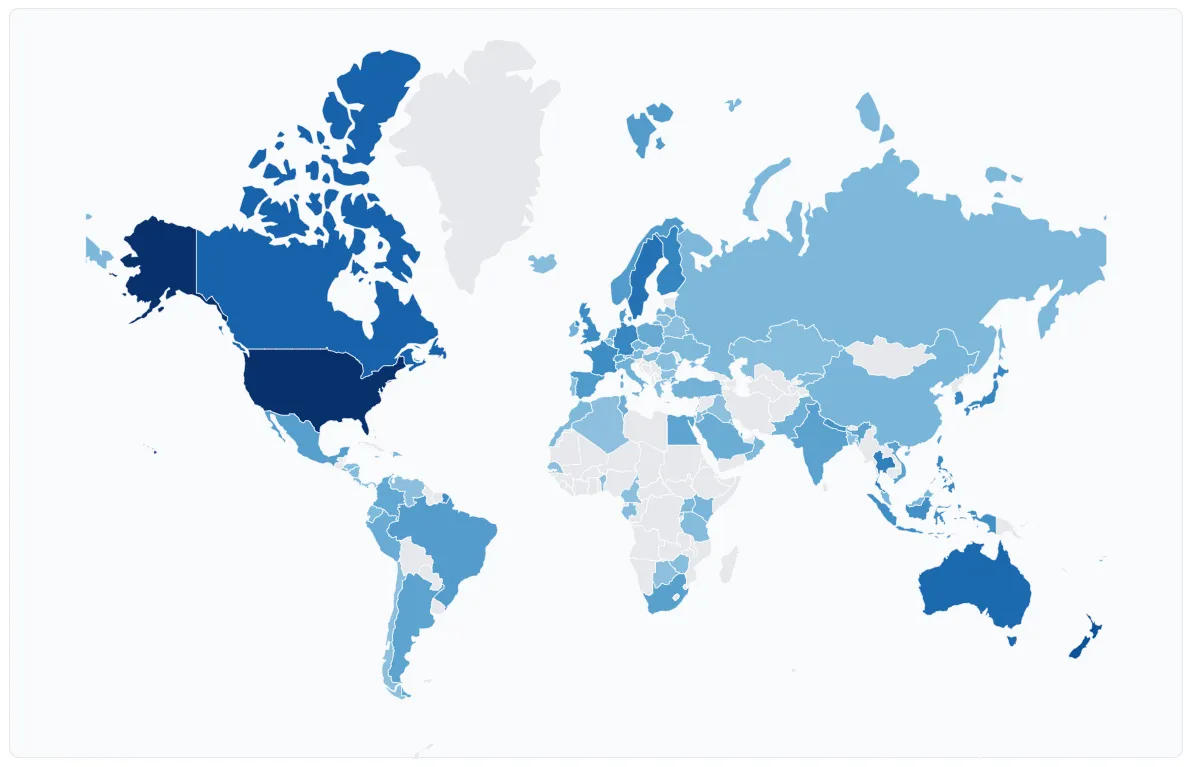
Used In 100+ Countries
Process Feedback is used by teachers and students in more than 100 countries. Thousands of teachers and students all around the world use it every day.

See it in action
See a sample student writing process report, or try it yourself. It is free for teachers and students.