Integration with D2L Brightspace
Process Feedback integrates into D2L Brightspace with and without LTI integration
Why Process Feedback
Process Feedback is a pedagogical alternative to plagiarism or AI-detection tools. It offers a constructive way to promote academic integrity.
Instead of flagging content after submission:
-
It helps teachers and students reflect on the writing process itself. -
It supports learning, transparency, and instructional dialogue rather than enforcement. -
It is student-centered since students are in control of their own data
Designed for institutional requirements
Process Feedback is designed to meet common institutional requirements related to compatibility, privacy, and deployment flexibility. The platform intentionally minimizes technical dependencies while supporting both small-scale pilots and broader institutional use.
Key design considerations include:
-
VPAT documentation available upon request -
HECVAT security review support available upon request -
Support for Data Processing Agreements (DPAs) and Data Sharing Agreements (DSAs) -
No student accounts required by default -
Deployment options for pilots, courses, or institution-wide use
Local-first approach: Minimizes privacy and security risks
Process Feedback is intentionally designed to reduce institutional risk while supporting instructional goals. It avoids centralized surveillance models and limits technical access to the minimum necessary for functionality.
Risk-minimizing design features include:
-
Teacher dashboards that run entirely in the browser with local processing by default -
Read-only LMS access with no write permissions required -
No automated surveillance, monitoring, or behavioral scoring -
Students control the access and sharing of their own data
How Process Feedback differs from detection-based tools
Many academic integrity tools focus on detecting or flagging content after submission, often relying on continuous data collection or automated scoring.
Process Feedback differs in that it is:
-
Designed for instructional transparency rather than post-hoc enforcement -
Focused on reflection on the writing process itself -
Free from automated judgments about authorship or intent

Multiple integration options for teachers and institutions
Process Feedback provides lightweight tools that integrate with existing instructional workflows. Teachers can pilot our tools without needing official institutional integration. Institutions can deploy Process Feedback with or without modifying LMS configurations or requiring new infrastructure.
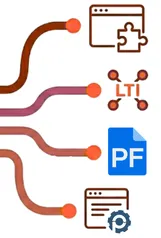
Available tools and integration options include:
-
Option 1. Students install Process Feedback extension -
Option 2. Core LTI v1.3 integration -
Option 3. Students use Google Docs -
Option 4. Students use Process Feedback editor
Integration Option 1. Students install Process Feedback extension
Our Process Feedback extension available in Chrome web store works on top of D2L assignments and discussion boards without students needing to create any accounts.
| Key feature: | Works with assignments and discussion boards directly, without LTI integration |
| LTI v1.3 core: | Not needed |
| Data collection: | No, students can choose |
| Who installs: | Students |
| Accounts required: | No |
| Mobile devices: | Not supported |
| Students submit: | Process data ZIP, writing report link, or report PDF |
| Teacher dashboard: | Yes, runs locally in the browser |

Integration Option 2. Core LTI v1.3 integration
With the core LTI v1.3 integration into a course in D2L, students can launch Process Feedback's editor directly from a D2L course or a D2L assignment.

| Key feature: | Core LTI v1.3 integration with D2L's authentication |
| LTI v1.3 core: | Yes |
| Data collection: | Yes, based on agreement |
| Who installs: | Institution |
| Accounts required: | Yes, but not a separate account |
| Mobile devices: | Not supported |
| Students submit: | Process data ZIP, writing report link, or report PDF |
| Teacher dashboard: | Yes |
Integration Option 3. Students use Google Docs
Since Google automatically collects writing process data, students can continue to use Google Docs as usual, without installing anything extra. Anytime after a writing project, students or teachers can use the Process Feedback for Google Docs extension to explore the writing process.
| Key feature: | Supports multi-author student projects and shows author collaborations |
| LTI v1.3 core: | Not needed |
| Data collection: | No, not by default |
| Who installs: | Students and/or teachers |
| Accounts required: | No |
| Mobile devices: | Yes, supported by Google Docs |
| Students submit: | Google Docs edit link, process data ZIP, writing report link, or report PDF |
| Teacher dashboard: | Yes |

Integration Option 4. Students use Process Feedback editor
The Process Feedback online editor is an online writing space for assignments where the writing process matters. As students write, the editor can generate a "writing process report" that they can review themselves or share with others for reflection, feedback, or discussion. Teachers decide how (or whether) to use the writing process report for feedback, discussion, or assessment.

| Key feature: | Optional real-time automatic teacher feedback to students, while they are at work |
| LTI v1.3 core: | Optional |
| Data collection: | Yes, but not automatic |
| Who installs: | Students use online editor |
| Accounts required: | No |
| Mobile devices: | Yes |
| Students submit: | Automatic submission, process data ZIP, writing report link, or report PDF |
| Teacher dashboard: | Yes |
Is it a surviellence tool?
Process Feedback is designed with this concern in mind. For example, a graduate student may notice that much of their writing happened late at night and reflect on whether that affected their focus, revision quality, or stress levels. This kind of insight may be intended for the student's own reflection, not for evaluation or judgment.
Teachers do NOT need to:
-
Ask students to share their writing process -
Review timestamps or detailed activity logs
Instead, teachers can:
-
Encourage students to privately review their own reports -
Assign reflection prompts -
Collect reflections rather than raw process data
How it supports the use of AI
Students and teachers increasingly use AI tools for learning and reflection. Rather than prohibiting AI use, Process Feedback provides a structured way to incorporate it responsibly.

The "Copy for AI" feature in a writing process report allows users to:
-
Export process data in a format optimized for AI interaction -
Use AI agents (of their own choice) to help interpret drafting patterns, revision cycles, and writing behaviors -
Generate reflection prompts based on their own writing process evidence -
Create personalized narratives about their writing habits
What Process Feedback does NOT do
We understand that institutional technology procurement requires rigorous evaluation of risk and compliance. Our LTI v1.3 implementation is built to minimize technical dependencies and prioritize student data privacy.
Process Feedback:
-
Does not replace institutional academic integrity policies: It provides data to support existing policies rather than overriding them. -
Does not automatically assign grades or scores: Our tools provide transparent data; teachers decide how to interpret and assess it. -
Does not monitor students outside instructional contexts: Activity is only recorded within specific assignments or editors. -
Does not require institution-wide surveillance or tracking: We avoid centralized surveillance models. -
Does not require write-access to your LMS: Our LTI integration uses read-only access to provide a secure launch environment.