How Process Feedback extensions work
Process Feedback extensions (including those for Google Docs, Canvas, and other platforms) are built on a “local-first” architecture. This means that by default, the analysis and generation of your writing process report happen entirely on your own device, without transmitting personal data to our servers.
Below is a detailed breakdown of how the technology works, using our Google Docs extension as the primary example.
The Workflow: What Happens When You Click
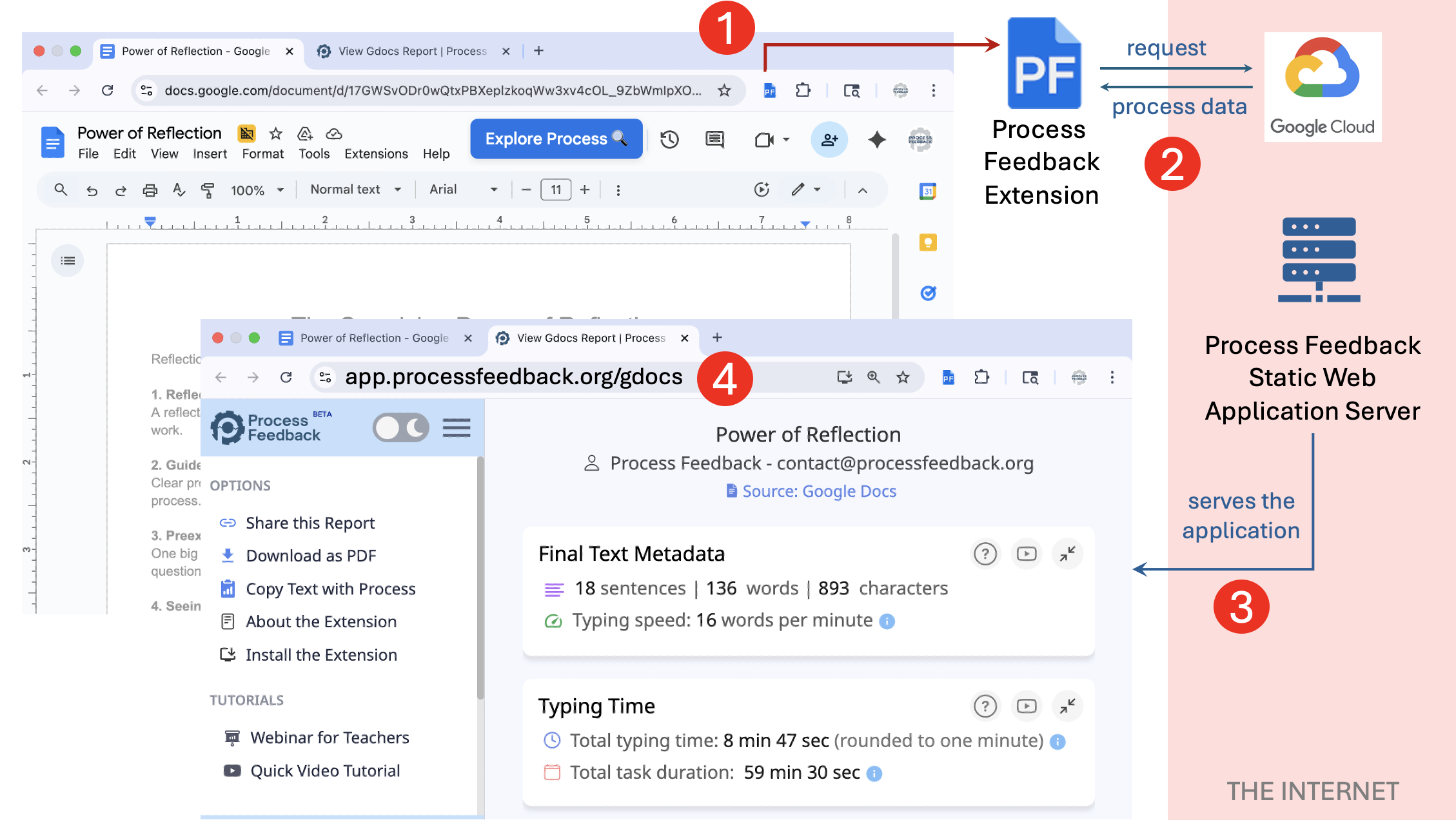
When a user clicks the “Explore Process” button inside Google Docs, a new tab opens with the URL app.processfeedback.org. While this looks like a standard website, the data flow is unique:
- The extension runs inside your browser tab. It requests writing process data from Google on your behalf.
- Once the data is downloaded, the extension saves it directly into your browser’s storage.
- The extension signals our web application to load. The web app reads the data from your local browser storage to generate the report.
Key Takeaway: Even though the report is displayed on processfeedback.org, the data driving it has not been uploaded to our cloud. It was passed internally within your browser. No Personally Identifiable Information (PII) is sent to our servers during this default process.
When your data leaves your device
For the extension itself, there is one user-initiated scenario where data is transmitted to our servers: the “Share this Report” feature.
This feature allows users to generate a link to an interactive version of their report to share with teachers or peers.
- This never happens automatically. The user must click “Share this report” in the sidebar.
- A clear privacy warning appears. Data is only uploaded if the user explicitly agrees and continues.
- Users concerned about privacy can instead download their process data as a ZIP file and share it securely offline.
Information for Institutions
1. Data security & encryption
For users who choose to use the sharing feature, by default, Process Feedback utilizes Cloudflare’s managed infrastructure to transfer and store user data.
- Data in Transit: All data transmission between the client and our servers is secured using Transport Layer Security (TLS) via the Cloudflare edge network.
- Data at Rest: Data is stored on Cloudflare’s managed infrastructure (utilizing services like R2 and D1). These services enforce AES-256 encryption (specifically GCM) for all data at rest, with keys managed securely by Cloudflare.
2. Why are Data Privacy Agreements required?
Even though the tool works locally by default, institutions often require Data Privacy Agreements (DPAs) because the “Share this Report” feature can be used to store student data if they choose to do so.
3. Disabling data collection
Some institutions prefer to eliminate this possibility entirely. Upon request, we can disable the sharing feature domain-wide. This ensures that no user from that institution can upload data to Process Feedback servers, maintaining a strictly local-only environment.
4. Technical verification (for IT administrators)
IT administrators can verify our local-first claims by performing the following audit:
- While the extension is running in Google Docs, open the Chrome Developer Tools and navigate to the Network Tab.
- Click the “Explore Process” button. You will see requests to Google APIs, but no data payload is sent to
processfeedback.orgor third-party tracking domains. - Close the new tab immediately and check your Chrome Storage. You will find the downloaded process data stored locally.
- Repeat the process and let the report load fully. Monitor the network activity again to confirm that personal data (PII) does not leave the browser.
5. If the “Share this Report” feature is disabled, can Process Feedback still collect personal data?
When the sharing feature is disabled at the domain level, Process Feedback will not store or receive report data from accounts associated with that institution.
However, if a student chooses to access Process Feedback using a personal (non-institutional) account (for example, by sharing the document to a personal email address such as student@gmail.com), that account is not governed by the institution’s domain policy and may still use the sharing feature.
In addition, users may voluntarily provide personal information when using the optional Live Chat support feature. This information is shared explicitly by the user and is not collected automatically by the system.
A common scenario where this boundary becomes blurred is co-authorship. Consider Student A, who belongs to an institution with the sharing feature disabled, and Student B, who is added as a co-author on the same document using their personal email. When Student B opens the extension under their personal account, the institution’s domain policy does not apply to them. Student B can still use the sharing feature and upload the report to Process Feedback servers, despite the document originating within an institutional context.
If your institution requires an organizational-level guarantee covering all potential channels, including support interactions and use of other Process Feedback tools, a signed Data Privacy Agreement (DPA) provides that assurance.
NOTE: If you have further technical questions about our architecture or security standards, please contact us.